
mCMS — модульная self-hosted CMS на CodeIgniter 4 для сайтов, публикаций и интернет-магазинов, с собственными темами и расширениями.
Мне хотелось сделать систему управления сайтом, в которой ядро отвечает за основу — пользователей, права, настройки, установку и жизненный цикл расширений, — а прикладные возможности подключаются отдельными модулями. Без обязательной привязки к чужим облакам, внешним сервисам и тяжёлой инфраструктуре.
Так появилась mCMS. Нужен сайт со страницами и новостями — включаются соответствующие модули. Нужен каталог товаров с корзиной, остатками, заказами и доставкой — подключается магазинная часть. Темы и сторонние расширения можно устанавливать отдельно от ядра.
Интерфейс и темы оформления
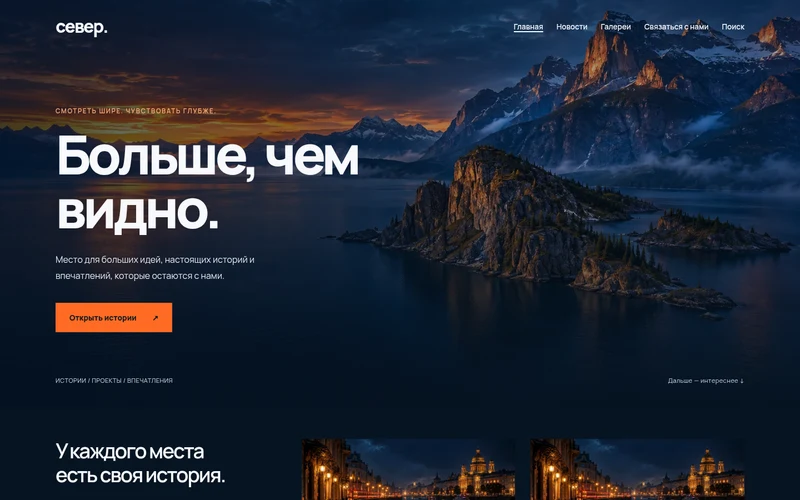
Пример сайта на одной из штатных тем mCMS — внешний вид можно менять, не затрагивая содержимое и модули.
Основные возможности
- страницы, новости, меню, галереи, медиафайлы и поиск по опубликованным материалам;
- визуальное редактирование, предпросмотр неопубликованных изменений, автосохранение и история редакций;
- система пользователей, групп и прав доступа, публичные вход, регистрация с CAPTCHA и личный кабинет;
- четыре штатные темы оформления — Default, Signature, Depth и Focus, настройка внешнего вида, брендинга и главной страницы;
- Theme API и установка сторонних тем из ZIP-архивов;
- модульная архитектура: каждый модуль управляет собственными настройками, маршрутами, правами, миграциями и данными;
- каталог расширений, установка модулей из ZIP с проверкой зависимостей, обновление и безопасное удаление с сохранением данных или полным удалением;
- SEO-настройки страниц и новостей, метаданные, правила формирования заголовков и описаний;
- каталог товаров с изображениями, вариантами и ценами, учёт остатков и резервов, корзина и оформление заказов;
- способы доставки и самовывоза, отчёты по заказам и экспорт CSV;
- необязательная встроенная аналитика посещений без стороннего аналитического сервиса;
- создание, скачивание и восстановление полных резервных копий сайта из панели управления;
- опциональные проверки обновлений ядра, модулей и тем; автоматическое применение настраивается отдельно и по умолчанию выключено.
Архитектура и развёртывание
Ядро mCMS построено на PHP и CodeIgniter 4, административный интерфейс использует Tabler, а публичная часть — систему сменных тем. Прикладная функциональность живёт в модулях: Media, Pages, Menus, News, Galleries, Feedback, SEO, Catalogue, Stock, Cart, Orders, Delivery и других.
Предусмотрено два основных способа установки:
- Docker Compose / Portainer — приложение, веб-сервер, база данных и постоянные тома для данных; для некоторых сценариев доступен отдельный сервис обновлений.
- Обычный PHP-хостинг — полный ZIP-пакет из GitHub Releases, установка через браузер и работа с MySQL. Публичный корень должен указывать на
public_html, а приватные каталоги — находиться вне DocumentRoot.
Состояние проекта
Статус: активная разработка; модули контента, оформления и базовые функции интернет-магазина реализованы, интерфейсы и возможности продолжают развиваться.
Платформа: веб-сервер с PHP; Docker / Portainer или совместимый standalone-хостинг.
Технологии: PHP, CodeIgniter 4, MariaDB / MySQL, Bootstrap, Tabler, JavaScript, Docker.
Лицензия: MIT для собственного кода mCMS.
Ссылки
Релизы и готовые пакеты · Руководство на русском · Исходный код · Сообщить об ошибке
История релизов
v0.1.10 — mCMS v0.1.10 — Docker and shared hosting
mCMS 0.1.10 — account redesign and standalone hosting documentation
Stable patch release for existing mCMS 0.1.x Docker/Portainer installations and shared-hosting sites. Includes all 0.1.9 features; no new database schema migrations are required for this release.
Changed
- Redesigned the user account dashboard: separate compact identity header, unified responsive workspace for profile and security, clearer buttons, removal of duplicate logout/navigation elements and invalid nested form markup.
- When the Orders service is enabled, the account dashboard shows the user's latest three orders and a direct link to the complete order history. Queries enforce the logged-in user's ID; no Orders tables are accessed if the module is disabled. Account and password forms retain CSRF, validation and existing server endpoints.
- Fixed mobile site header spacing when signed-in account links and the theme navigation compete for width.
- Added theme-independent responsive styling shared across all bundled themes and standalone layouts; account CSS URLs now include the Core version to prevent stale browser caches.
- Documented Nginx + PHP-FPM, Caddy + PHP-FPM, Apache without mod_rewrite, and LiteSpeed/OpenLiteSpeed in full Russian and English administrator guides. The web-server requirement is front-controller routing and protected private files, not Apache/mod_rewrite specifically. Media URLs must be forwarded to the PHP controller even though CSS/JS is served statically.
Upgrading & rollback
- Official standalone PHP installer package:
mcms-0.1.10-shared-hosting.zip(includes Composer dependencies, frontend assets and both manuals). CheckSHA256SUMSfrom the same GitHub Release; do not use GitHub's source ZIP as a shared-host installer. - Docker: app/web images published as
ghcr.io/mirivlad/mcms-app:v0.1.10,ghcr.io/mirivlad/mcms-web:v0.1.10and:stable. An opt-in Core auto-updater onportainer-release-stack.ymlmay deploy this compatible patch release only when Portainer HTTPS API credentials, Stack/Endpoint IDs, MariaDB digest pin andMCMS_IMAGE_TAG=stableare correctly configured. - Back up and download the full site ZIP before upgrading. Portainer auto-updates are not a guarantee of automatic rollback for image/database failures. Keep the previous release image/tag and archive until verification.
- Shared hosting: use the verified patch ZIP updater in
/admin/updates. The existing webroot and rescue bootstrap files remain unchanged, allowing staged code swap/rollback.
v0.1.9 — mCMS v0.1.9 — Docker and shared hosting
mCMS 0.1.9 — first public dual-deployment release
This release supports both Docker/Portainer deployments and conventional Apache/PHP/MySQL shared hosting without requiring Docker, SSH or Composer on the hosting account. It uses one Core/module/theme implementation for both modes.
Get started / Начало работы: English manual · Руководство на русском. The official release asset mcms-0.1.9-shared-hosting.zip includes all PHP dependencies, bundled frontend resources, both user manuals, and a browser-first MySQL installer. The standard Git Stack uses portainer-stack.yml; no Docker Hub mcms:dev image is needed.
Major additions
- Standalone installation with PHP/extensions/document-root preflight, MySQL credentials and initialization, optional SMTP, and a first-superadmin wizard.
- Apache/PHP Media delivery with strict filenames and private-directory isolation.
- PHP-only logical backups, database restore, module/theme updates and recovery procedures for hosts without shell utilities.
- Validated, manual same-minor patch Core ZIP upgrades for standalone, including a site backup, staged code swap and independent pre-bootstrap recovery logic.
- Russian and English user and administrator documentation: install, update, modules, themes, backup, restore, rollback, troubleshooting for both deployment modes.
Release safety notes
- Back up and download the ZIP off-server before updates; preserve compatible Core source/images and deployment configuration. Never remove production Docker volumes during redeploy.
- The backup schema is tied to the exact Core version. Standalone PHP database exports are not interchangeable with Docker's CLI SQL dumps through the web restore wizard.
- The Core ZIP updater is deliberately limited to patch releases in the current X.Y line, with the same bootstrap entry files. Other upgrades require supervised manual work. Automatic updates are off by default.
- PHP shared-hosting quotas, timeouts, storage permissions and SQL dialect differences can prevent large-site restores. Keep external backups and test recovery on a separate instance. Package hashes detect corruption but do not authenticate unknown third-party code.
- Docker Core auto-update through the Portainer API still does not guarantee automatic rollback of image and database migrations.
All artifacts are built from this tag and checksummed in SHA256SUMS. Do not install the GitHub-generated "Source code" ZIP on shared hosting: it does not include vendor dependencies or built UI assets.
Источник: GitHub Releases · данные кэшируются на сервере.