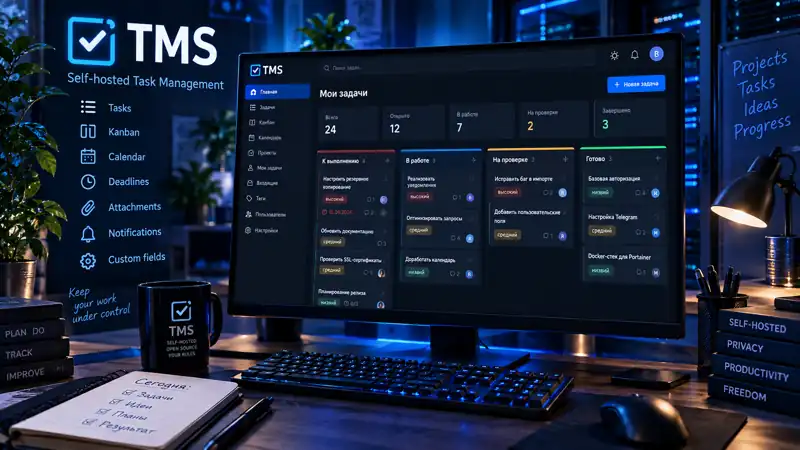
Self-hosted система управления задачами для тех, кто хочет держать задачи и рабочие данные на собственной инфраструктуре.
Мне нужен был обычный рабочий инструмент для задач — без привязки к чужому облаку, подписке или сервису, который завтра может изменить условия. Поэтому TMS с самого начала рассчитан на собственный сервер, Docker и нормальный рабочий интерфейс без лишней усложнённости.
Проект уже опубликован как open source: исходники находятся на GitHub, готовые контейнерные образы — в GitHub Container Registry, а для Portainer есть отдельный готовый stack-файл.
Что умеет TMS
список задач, Kanban-доска и календарь с расширенными фильтрами;
быстрое создание задач и компактный просмотр с редактированием статуса, описания и срока;
полноценные описания, вложения, сроки, приоритеты и типы задач;
заказчики и типизированные пользовательские поля;
личные и командные проекты с файлами, собственными статусами и дополнительными полями;
команды с ролями руководителя и участника, приглашениями и назначением исполнителей;
обсуждения задач и проектов с ответами, упоминаниями и уведомлениями;
счётчики обсуждений и индикаторы непрочитанного на задачах и проектах;
фильтры, сортировка, пагинация и массовые операции;
повторяющиеся задачи и отдельное запланированное время выполнения;
сохранённые пользовательские представления задач с собственными фильтрами и сортировкой;
подписанные HMAC-SHA256 исходящие webhooks, журнал событий и история доставки интеграций;
проектные статусы учитываются отдельно от личных: без проекта используются личные статусы, выбранный проект — его workflow, а режим «Все проекты» показывает доступные статусы целиком;
индивидуальные язык, часовой пояс, уведомления и тема оформления для каждого пользователя;
русский и английский интерфейс;
многопользовательская работа с изоляцией данных;
опциональная самостоятельная регистрация с подтверждением email и одобрением администратора;
уведомления по SMTP/email и Telegram, включая Long polling и Webhook;
восстановление пароля через браузер и локальную консоль администратора.
Развёртывание
TMS рассчитан прежде всего на self-hosted-сценарий. В репозитории есть готовые варианты для Docker Compose и Portainer:
compose.yaml — обычный Docker Compose;
compose.portainer.yaml — готовый Stack для Portainer.
Готовые образы публикуются в GitHub Container Registry:
ghcr.io/mirivlad/tms:latest
Тег latest указывает на последний стабильный релиз. Для воспроизводимых установок можно использовать версионный тег. Образы собираются для linux/amd64 и linux/arm64.
TMS stable release for self-hosted task management.
Included:
secure login, persistent sessions and password recovery;
isolated multi-user task data, metadata and attachments;
dashboard counters, status distribution, stale tasks and daily tips;
task list, Kanban board and calendar with advanced filtering;
append-only task and project activity history for meaningful changes;
ordered task checklists with progress tracking and activity events;
private saved task views for reusable filters, sorting, project scope and an optional default view;
recurring task series with daily, weekly, monthly, every-N-days and N-days-after-completion schedules, generated idempotently as new task occurrences;
separate planned execution time () alongside deadline across task editing, filtering, Saved Views, Calendar and recurrence;
lightweight realtime navigation badges for unread notifications and team invitations while the browser tab is active;
a durable domain-event journal driving activity history, work-event notifications and external integrations;
configurable event notifications for assignments/reassignments, planned/deadline changes, optional status changes and upcoming planned/deadline times;
administrator-managed outbound webhooks with encrypted signing secrets, HMAC-SHA256 signatures, durable retries, delivery history and a dedicated worker;
complete User and Administrator handbooks in English and Russian, generated as HTML/PDF and attached to each version release;
dense responsive workbench layout across dashboard, tasks, projects, teams, discussions, notifications and administration, with mobile task cards and focused navigation;
project-aware status filters in Tasks and Calendar: No project uses personal statuses, a selected project uses its workflow, and All projects exposes all accessible statuses;
global quick add, task quick view with inline status/description/deadline editing and bulk task operations;
rich-text descriptions, customers and owner-scoped custom fields;
type-aware custom-field editing, money formatting and typed task filters;
personal and team-owned projects with project files, project-specific task statuses and custom fields;
teams with lead/member roles, invitations and task assignees;
dedicated task discussion workspaces with rich editing for new comments, replies and edits;
project discussion aggregation across project-level and task-level threads, grouped by task;
redesigned discussion workspaces with a compact integrated composer, flatter message hierarchy, reply rails and a desktop task-discussion sidebar;
discussion counters and unread indicators on task/project surfaces with per-user, per-team read cursors;
project/task discussions with shallow replies, @mentions and canonical in-app notifications;
collaboration ACL hardening and a tested v0.1.4-to-v0.2.0 database upgrade path;
per-user timezone, notification preferences and six interface theme modes;
Projects and Teams available directly from the primary desktop navigation, with notifications, invitations and application settings grouped inside the user menu;
focused Project workspaces with separate Overview, Settings, Statuses, Custom fields, Files and Discussion pages;
project status editing aligned with the compact personal-status UI;
focused Team workspaces with separate Overview, Settings and Members pages, plus modal creation and invitations;
secure project ownership transfer between personal and team scopes, including team-scoped discussion history and cleanup of stale assignees/personal task metadata;
Overview summaries for projects, teams and unassigned work;
calendar day quick-add and customer autocomplete;
pre-v0.2.7 Kanban wheel handoff: scroll the active column vertically while possible, then continue across the board horizontally at the column boundary, with Shift-wheel available for immediate horizontal movement;
continuous desktop Kanban wheel scrolling without CSS scroll-snap interference; mobile swipe snapping remains enabled;
conditional, color-distinct notification and invitation badges beside the username, rendered only when their counters are non-zero;
viewport-aware Kanban sizing that keeps the horizontal board scroller reachable when filters or selectors appear above it;
explicit expand/collapse state indication for the task-list Filters accordion;
optional self-registration with visual CAPTCHA, email verification and administrator approval;
administrator user management, direct account creation, quick user details and impersonation;
SMTP/email and Telegram notification delivery with administrator-managed credentials, selectable Long polling/Webhook command delivery, independently saved HTTP/SOCKS proxy settings and per-user Telegram delivery testing;
Russian and English interface catalogs with count-aware pluralization for natural numeric UI labels;
MariaDB migrations, first-admin CLI bootstrap, Docker Compose and Portainer deployment.
Stable v0.4.2 is the supported baseline for subsequent compatible fixes and incremental releases.
TMS stable release for self-hosted task management.
Included:
secure login, persistent sessions and password recovery;
isolated multi-user task data, metadata and attachments;
dashboard counters, status distribution, stale tasks and daily tips;
task list, Kanban board and calendar with advanced filtering;
append-only task and project activity history for meaningful changes;
ordered task checklists with progress tracking and activity events;
private saved task views for reusable filters, sorting, project scope and an optional default view;
recurring task series with daily, weekly, monthly, every-N-days and N-days-after-completion schedules, generated idempotently as new task occurrences;
separate planned execution time () alongside deadline across task editing, filtering, Saved Views, Calendar and recurrence;
lightweight realtime navigation badges for unread notifications and team invitations while the browser tab is active;
a durable domain-event journal driving activity history, work-event notifications and external integrations;
configurable event notifications for assignments/reassignments, planned/deadline changes, optional status changes and upcoming planned/deadline times;
administrator-managed outbound webhooks with encrypted signing secrets, HMAC-SHA256 signatures, durable retries, delivery history and a dedicated worker;
complete User and Administrator handbooks in English and Russian, generated as HTML/PDF and attached to each version release;
dense responsive workbench layout across dashboard, tasks, projects, teams, discussions, notifications and administration, with mobile task cards and focused navigation;
project-aware status filters in Tasks and Calendar: No project uses personal statuses, a selected project uses its workflow, and All projects exposes all accessible statuses;
global quick add, task quick view with inline status/description/deadline editing and bulk task operations;
rich-text descriptions, customers and owner-scoped custom fields;
type-aware custom-field editing, money formatting and typed task filters;
personal and team-owned projects with project files, project-specific task statuses and custom fields;
teams with lead/member roles, invitations and task assignees;
dedicated task discussion workspaces with rich editing for new comments, replies and edits;
project discussion aggregation across project-level and task-level threads, grouped by task;
redesigned discussion workspaces with a compact integrated composer, flatter message hierarchy, reply rails and a desktop task-discussion sidebar;
discussion counters and unread indicators on task/project surfaces with per-user, per-team read cursors;
project/task discussions with shallow replies, @mentions and canonical in-app notifications;
collaboration ACL hardening and a tested v0.1.4-to-v0.2.0 database upgrade path;
per-user timezone, notification preferences and six interface theme modes;
Projects and Teams available directly from the primary desktop navigation, with notifications, invitations and application settings grouped inside the user menu;
focused Project workspaces with separate Overview, Settings, Statuses, Custom fields, Files and Discussion pages;
project status editing aligned with the compact personal-status UI;
focused Team workspaces with separate Overview, Settings and Members pages, plus modal creation and invitations;
secure project ownership transfer between personal and team scopes, including team-scoped discussion history and cleanup of stale assignees/personal task metadata;
Overview summaries for projects, teams and unassigned work;
calendar day quick-add and customer autocomplete;
pre-v0.2.7 Kanban wheel handoff: scroll the active column vertically while possible, then continue across the board horizontally at the column boundary, with Shift-wheel available for immediate horizontal movement;
continuous desktop Kanban wheel scrolling without CSS scroll-snap interference; mobile swipe snapping remains enabled;
conditional, color-distinct notification and invitation badges beside the username, rendered only when their counters are non-zero;
viewport-aware Kanban sizing that keeps the horizontal board scroller reachable when filters or selectors appear above it;
explicit expand/collapse state indication for the task-list Filters accordion;
optional self-registration with visual CAPTCHA, email verification and administrator approval;
administrator user management, direct account creation, quick user details and impersonation;
SMTP/email and Telegram notification delivery with administrator-managed credentials, selectable Long polling/Webhook command delivery, independently saved HTTP/SOCKS proxy settings and per-user Telegram delivery testing;
Russian and English interface catalogs with count-aware pluralization for natural numeric UI labels;
MariaDB migrations, first-admin CLI bootstrap, Docker Compose and Portainer deployment.
Stable v0.4.1 is the supported baseline for subsequent compatible fixes and incremental releases.
TMS stable release for self-hosted task management.
Included:
secure login, persistent sessions and password recovery;
isolated multi-user task data, metadata and attachments;
dashboard counters, status distribution, stale tasks and daily tips;
task list, Kanban board and calendar with advanced filtering;
append-only task and project activity history for meaningful changes;
ordered task checklists with progress tracking and activity events;
private saved task views for reusable filters, sorting, project scope and an optional default view;
recurring task series with daily, weekly, monthly, every-N-days and N-days-after-completion schedules, generated idempotently as new task occurrences;
separate planned execution time () alongside deadline across task editing, filtering, Saved Views, Calendar and recurrence;
lightweight realtime navigation badges for unread notifications and team invitations while the browser tab is active;
a durable domain-event journal driving activity history, work-event notifications and external integrations;
configurable event notifications for assignments/reassignments, planned/deadline changes, optional status changes and upcoming planned/deadline times;
administrator-managed outbound webhooks with encrypted signing secrets, HMAC-SHA256 signatures, durable retries, delivery history and a dedicated worker;
complete User and Administrator handbooks in English and Russian, generated as HTML/PDF and attached to each version release;
dense responsive workbench layout across dashboard, tasks, projects, teams, discussions, notifications and administration, with mobile task cards and focused navigation;
project-aware status filters in Tasks and Calendar: No project uses personal statuses, a selected project uses its workflow, and All projects exposes all accessible statuses;
global quick add, task quick view with inline status/description/deadline editing and bulk task operations;
rich-text descriptions, customers and owner-scoped custom fields;
type-aware custom-field editing, money formatting and typed task filters;
personal and team-owned projects with project files, project-specific task statuses and custom fields;
teams with lead/member roles, invitations and task assignees;
dedicated task discussion workspaces with rich editing for new comments, replies and edits;
project discussion aggregation across project-level and task-level threads, grouped by task;
redesigned discussion workspaces with a compact integrated composer, flatter message hierarchy, reply rails and a desktop task-discussion sidebar;
discussion counters and unread indicators on task/project surfaces with per-user, per-team read cursors;
project/task discussions with shallow replies, @mentions and canonical in-app notifications;
collaboration ACL hardening and a tested v0.1.4-to-v0.2.0 database upgrade path;
per-user timezone, notification preferences and six interface theme modes;
Projects and Teams available directly from the primary desktop navigation, with notifications, invitations and application settings grouped inside the user menu;
focused Project workspaces with separate Overview, Settings, Statuses, Custom fields, Files and Discussion pages;
project status editing aligned with the compact personal-status UI;
focused Team workspaces with separate Overview, Settings and Members pages, plus modal creation and invitations;
secure project ownership transfer between personal and team scopes, including team-scoped discussion history and cleanup of stale assignees/personal task metadata;
Overview summaries for projects, teams and unassigned work;
calendar day quick-add and customer autocomplete;
pre-v0.2.7 Kanban wheel handoff: scroll the active column vertically while possible, then continue across the board horizontally at the column boundary, with Shift-wheel available for immediate horizontal movement;
continuous desktop Kanban wheel scrolling without CSS scroll-snap interference; mobile swipe snapping remains enabled;
conditional, color-distinct notification and invitation badges beside the username, rendered only when their counters are non-zero;
viewport-aware Kanban sizing that keeps the horizontal board scroller reachable when filters or selectors appear above it;
explicit expand/collapse state indication for the task-list Filters accordion;
optional self-registration with visual CAPTCHA, email verification and administrator approval;
administrator user management, direct account creation, quick user details and impersonation;
SMTP/email and Telegram notification delivery with administrator-managed credentials, selectable Long polling/Webhook command delivery, independently saved HTTP/SOCKS proxy settings and per-user Telegram delivery testing;
Russian and English interface catalogs with count-aware pluralization for natural numeric UI labels;
MariaDB migrations, first-admin CLI bootstrap, Docker Compose and Portainer deployment.
Stable v0.4.0 is the supported baseline for subsequent compatible fixes and incremental releases.
TMS stable release for self-hosted task management.
Included:
secure login, persistent sessions and password recovery;
isolated multi-user task data, metadata and attachments;
dashboard counters, status distribution, stale tasks and daily tips;
task list, Kanban board and calendar with advanced filtering;
append-only task and project activity history for meaningful changes;
ordered task checklists with progress tracking and activity events;
private saved task views for reusable filters, sorting, project scope and an optional default view;
recurring task series with daily, weekly, monthly, every-N-days and N-days-after-completion schedules, generated idempotently as new task occurrences;
dense responsive workbench layout across dashboard, tasks, projects, teams, discussions, notifications and administration, with mobile task cards and focused navigation;
project-aware status filters in Tasks and Calendar: No project uses personal statuses, a selected project uses its workflow, and All projects exposes all accessible statuses;
global quick add, task quick view with inline status/description/deadline editing and bulk task operations;
rich-text descriptions, customers and owner-scoped custom fields;
type-aware custom-field editing, money formatting and typed task filters;
personal and team-owned projects with project files, project-specific task statuses and custom fields;
teams with lead/member roles, invitations and task assignees;
dedicated task discussion workspaces with rich editing for new comments, replies and edits;
project discussion aggregation across project-level and task-level threads, grouped by task;
redesigned discussion workspaces with a compact integrated composer, flatter message hierarchy, reply rails and a desktop task-discussion sidebar;
discussion counters and unread indicators on task/project surfaces with per-user, per-team read cursors;
project/task discussions with shallow replies, @mentions and canonical in-app notifications;
collaboration ACL hardening and a tested v0.1.4-to-v0.2.0 database upgrade path;
per-user timezone, notification preferences and six interface theme modes;
Projects and Teams available directly from the primary desktop navigation, with notifications, invitations and application settings grouped inside the user menu;
focused Project workspaces with separate Overview, Settings, Statuses, Custom fields, Files and Discussion pages;
project status editing aligned with the compact personal-status UI;
focused Team workspaces with separate Overview, Settings and Members pages, plus modal creation and invitations;
secure project ownership transfer between personal and team scopes, including team-scoped discussion history and cleanup of stale assignees/personal task metadata;
Overview summaries for projects, teams and unassigned work;
calendar day quick-add and customer autocomplete;
pre-v0.2.7 Kanban wheel handoff: scroll the active column vertically while possible, then continue across the board horizontally at the column boundary, with Shift-wheel available for immediate horizontal movement;
continuous desktop Kanban wheel scrolling without CSS scroll-snap interference; mobile swipe snapping remains enabled;
conditional, color-distinct notification and invitation badges beside the username, rendered only when their counters are non-zero;
viewport-aware Kanban sizing that keeps the horizontal board scroller reachable when filters or selectors appear above it;
explicit expand/collapse state indication for the task-list Filters accordion;
optional self-registration with visual CAPTCHA, email verification and administrator approval;
administrator user management, direct account creation, quick user details and impersonation;
SMTP/email and Telegram notification delivery with administrator-managed credentials, selectable Long polling/Webhook command delivery, independently saved HTTP/SOCKS proxy settings and per-user Telegram delivery testing;
Russian and English interface catalogs with count-aware pluralization for natural numeric UI labels;
MariaDB migrations, first-admin CLI bootstrap, Docker Compose and Portainer deployment.
Stable v0.3.5 is the supported baseline for subsequent compatible fixes and incremental releases.
TMS stable release for self-hosted task management.
Included:
secure login, persistent sessions and password recovery;
isolated multi-user task data, metadata and attachments;
dashboard counters, status distribution, stale tasks and daily tips;
task list, Kanban board and calendar with advanced filtering;
append-only task and project activity history for meaningful changes;
ordered task checklists with progress tracking and activity events;
private saved task views for reusable filters, sorting, project scope and an optional default view;
recurring task series with daily, weekly, monthly, every-N-days and N-days-after-completion schedules, generated idempotently as new task occurrences;
dense responsive workbench layout across dashboard, tasks, projects, teams, discussions, notifications and administration, with mobile task cards and focused navigation;
project-aware status filters in Tasks and Calendar: No project uses personal statuses, a selected project uses its workflow, and All projects exposes all accessible statuses;
global quick add, task quick view with inline status/description/deadline editing and bulk task operations;
rich-text descriptions, customers and owner-scoped custom fields;
type-aware custom-field editing, money formatting and typed task filters;
personal and team-owned projects with project files, project-specific task statuses and custom fields;
teams with lead/member roles, invitations and task assignees;
dedicated task discussion workspaces with rich editing for new comments, replies and edits;
project discussion aggregation across project-level and task-level threads, grouped by task;
redesigned discussion workspaces with a compact integrated composer, flatter message hierarchy, reply rails and a desktop task-discussion sidebar;
discussion counters and unread indicators on task/project surfaces with per-user, per-team read cursors;
project/task discussions with shallow replies, @mentions and canonical in-app notifications;
collaboration ACL hardening and a tested v0.1.4-to-v0.2.0 database upgrade path;
per-user timezone, notification preferences and six interface theme modes;
Projects and Teams available directly from the primary desktop navigation, with notifications, invitations and application settings grouped inside the user menu;
focused Project workspaces with separate Overview, Settings, Statuses, Custom fields, Files and Discussion pages;
project status editing aligned with the compact personal-status UI;
focused Team workspaces with separate Overview, Settings and Members pages, plus modal creation and invitations;
secure project ownership transfer between personal and team scopes, including team-scoped discussion history and cleanup of stale assignees/personal task metadata;
Overview summaries for projects, teams and unassigned work;
calendar day quick-add and customer autocomplete;
pre-v0.2.7 Kanban wheel handoff: scroll the active column vertically while possible, then continue across the board horizontally at the column boundary, with Shift-wheel available for immediate horizontal movement;
conditional, color-distinct notification and invitation badges beside the username, rendered only when their counters are non-zero;
viewport-aware Kanban sizing that keeps the horizontal board scroller reachable when filters or selectors appear above it;
explicit expand/collapse state indication for the task-list Filters accordion;
optional self-registration with visual CAPTCHA, email verification and administrator approval;
administrator user management, direct account creation, quick user details and impersonation;
SMTP/email and Telegram notification delivery with administrator-managed credentials, selectable Long polling/Webhook command delivery, independently saved HTTP/SOCKS proxy settings and per-user Telegram delivery testing;
Russian and English interface catalogs with count-aware pluralization for natural numeric UI labels;
MariaDB migrations, first-admin CLI bootstrap, Docker Compose and Portainer deployment.
Stable v0.3.4 is the supported baseline for subsequent compatible fixes and incremental releases.
TMS stable release for self-hosted task management.
Included:
secure login, persistent sessions and password recovery;
isolated multi-user task data, metadata and attachments;
dashboard counters, status distribution, stale tasks and daily tips;
task list, Kanban board and calendar with advanced filtering;
append-only task and project activity history for meaningful changes;
ordered task checklists with progress tracking and activity events;
private saved task views for reusable filters, sorting, project scope and an optional default view;
recurring task series with daily, weekly, monthly, every-N-days and N-days-after-completion schedules, generated idempotently as new task occurrences;
dense responsive workbench layout across dashboard, tasks, projects, teams, discussions, notifications and administration, with mobile task cards and focused navigation;
project-aware status filters in Tasks and Calendar: No project uses personal statuses, a selected project uses its workflow, and All projects exposes all accessible statuses;
global quick add, task quick view with inline status/description/deadline editing and bulk task operations;
rich-text descriptions, customers and owner-scoped custom fields;
type-aware custom-field editing, money formatting and typed task filters;
personal and team-owned projects with project files, project-specific task statuses and custom fields;
teams with lead/member roles, invitations and task assignees;
dedicated task discussion workspaces with rich editing for new comments, replies and edits;
project discussion aggregation across project-level and task-level threads, grouped by task;
redesigned discussion workspaces with a compact integrated composer, flatter message hierarchy, reply rails and a desktop task-discussion sidebar;
discussion counters and unread indicators on task/project surfaces with per-user, per-team read cursors;
project/task discussions with shallow replies, @mentions and canonical in-app notifications;
collaboration ACL hardening and a tested v0.1.4-to-v0.2.0 database upgrade path;
per-user timezone, notification preferences and six interface theme modes;
Projects and Teams available directly from the primary desktop navigation, with notifications, invitations and application settings grouped inside the user menu;
focused Project workspaces with separate Overview, Settings, Statuses, Custom fields, Files and Discussion pages;
project status editing aligned with the compact personal-status UI;
focused Team workspaces with separate Overview, Settings and Members pages, plus modal creation and invitations;
secure project ownership transfer between personal and team scopes, including team-scoped discussion history and cleanup of stale assignees/personal task metadata;
Overview summaries for projects, teams and unassigned work;
calendar day quick-add, customer autocomplete and mouse-wheel horizontal navigation across wide Kanban boards;
conditional, color-distinct notification and invitation badges beside the username, rendered only when their counters are non-zero;
viewport-aware Kanban sizing that keeps the horizontal board scroller reachable when filters or selectors appear above it;
explicit expand/collapse state indication for the task-list Filters accordion;
optional self-registration with visual CAPTCHA, email verification and administrator approval;
administrator user management, direct account creation, quick user details and impersonation;
SMTP/email and Telegram notification delivery with administrator-managed credentials, selectable Long polling/Webhook command delivery, independently saved HTTP/SOCKS proxy settings and per-user Telegram delivery testing;
Russian and English interface catalogs with count-aware pluralization for natural numeric UI labels;
MariaDB migrations, first-admin CLI bootstrap, Docker Compose and Portainer deployment.
Stable v0.3.3 is the supported baseline for subsequent compatible fixes and incremental releases.
TMS stable release for self-hosted task management.
Included:
secure login, persistent sessions and password recovery;
isolated multi-user task data, metadata and attachments;
dashboard counters, status distribution, stale tasks and daily tips;
task list, Kanban board and calendar with advanced filtering;
append-only task and project activity history for meaningful changes;
ordered task checklists with progress tracking and activity events;
private saved task views for reusable filters, sorting, project scope and an optional default view;
recurring task series with daily, weekly, monthly, every-N-days and N-days-after-completion schedules, generated idempotently as new task occurrences;
dense responsive workbench layout across dashboard, tasks, projects, teams, discussions, notifications and administration, with mobile task cards and focused navigation;
project-aware status filters in Tasks and Calendar: No project uses personal statuses, a selected project uses its workflow, and All projects exposes all accessible statuses;
global quick add, task quick view with inline status/description/deadline editing and bulk task operations;
rich-text descriptions, customers and owner-scoped custom fields;
type-aware custom-field editing, money formatting and typed task filters;
personal and team-owned projects with project files, project-specific task statuses and custom fields;
teams with lead/member roles, invitations and task assignees;
dedicated task discussion workspaces with rich editing for new comments, replies and edits;
project discussion aggregation across project-level and task-level threads, grouped by task;
redesigned discussion workspaces with a compact integrated composer, flatter message hierarchy, reply rails and a desktop task-discussion sidebar;
discussion counters and unread indicators on task/project surfaces with per-user, per-team read cursors;
project/task discussions with shallow replies, @mentions and canonical in-app notifications;
collaboration ACL hardening and a tested v0.1.4-to-v0.2.0 database upgrade path;
per-user timezone, notification preferences and six interface theme modes;
Projects and Teams available directly from the primary desktop navigation, with application settings grouped inside the user menu;
focused Project workspaces with separate Overview, Settings, Statuses, Custom fields, Files and Discussion pages;
project status editing aligned with the compact personal-status UI;
focused Team workspaces with separate Overview, Settings and Members pages, plus modal creation and invitations;
secure project ownership transfer between personal and team scopes, including team-scoped discussion history and cleanup of stale assignees/personal task metadata;
Overview summaries for projects, teams and unassigned work;
calendar day quick-add, customer autocomplete and wheel-aware wide-board navigation;
viewport-aware Kanban sizing that keeps the horizontal board scroller reachable when filters or selectors appear above it;
explicit expand/collapse state indication for the task-list Filters accordion;
optional self-registration with visual CAPTCHA, email verification and administrator approval;
administrator user management, direct account creation, quick user details and impersonation;
SMTP/email and Telegram notification delivery with administrator-managed credentials, selectable Long polling/Webhook command delivery, independently saved HTTP/SOCKS proxy settings and per-user Telegram delivery testing;
Russian and English interface catalogs with count-aware pluralization for natural numeric UI labels;
MariaDB migrations, first-admin CLI bootstrap, Docker Compose and Portainer deployment.
Stable v0.3.2 is the supported baseline for subsequent compatible fixes and incremental releases.
TMS stable release for self-hosted task management.
Included:
secure login, persistent sessions and password recovery;
isolated multi-user task data, metadata and attachments;
dashboard counters, status distribution, stale tasks and daily tips;
task list, Kanban board and calendar with advanced filtering;
append-only task and project activity history for meaningful changes;
ordered task checklists with progress tracking and activity events;
private saved task views for reusable filters, sorting, project scope and an optional default view;
recurring task series with daily, weekly, monthly, every-N-days and N-days-after-completion schedules, generated idempotently as new task occurrences;
dense responsive workbench layout across dashboard, tasks, projects, teams, discussions, notifications and administration, with mobile task cards and focused navigation;
project-aware status filters in Tasks and Calendar: No project uses personal statuses, a selected project uses its workflow, and All projects exposes all accessible statuses;
global quick add, task quick view with inline status/description/deadline editing and bulk task operations;
rich-text descriptions, customers and owner-scoped custom fields;
type-aware custom-field editing, money formatting and typed task filters;
personal and team-owned projects with project files, project-specific task statuses and custom fields;
teams with lead/member roles, invitations and task assignees;
dedicated task discussion workspaces with rich editing for new comments, replies and edits;
project discussion aggregation across project-level and task-level threads, grouped by task;
redesigned discussion workspaces with a compact integrated composer, flatter message hierarchy, reply rails and a desktop task-discussion sidebar;
discussion counters and unread indicators on task/project surfaces with per-user, per-team read cursors;
project/task discussions with shallow replies, @mentions and canonical in-app notifications;
collaboration ACL hardening and a tested v0.1.4-to-v0.2.0 database upgrade path;
per-user timezone, notification preferences and six interface theme modes;
desktop-first Projects and Teams management, with collaboration setup moved out of the primary work navigation into the user menu;
focused Project workspaces with separate Overview, Settings, Statuses, Custom fields, Files and Discussion pages;
project status editing aligned with the compact personal-status UI;
focused Team workspaces with separate Overview, Settings and Members pages, plus modal creation and invitations;
secure project ownership transfer between personal and team scopes, including team-scoped discussion history and cleanup of stale assignees/personal task metadata;
Overview summaries for projects, teams and unassigned work;
calendar day quick-add, customer autocomplete and wheel-aware wide-board navigation;
optional self-registration with visual CAPTCHA, email verification and administrator approval;
administrator user management, direct account creation, quick user details and impersonation;
SMTP/email and Telegram notification delivery with administrator-managed credentials, selectable Long polling/Webhook command delivery, independently saved HTTP/SOCKS proxy settings and per-user Telegram delivery testing;
Russian and English interface catalogs with count-aware pluralization for natural numeric UI labels;
MariaDB migrations, first-admin CLI bootstrap, Docker Compose and Portainer deployment.
Stable v0.3.1 is the supported baseline for subsequent compatible fixes and incremental releases.
TMS stable release for self-hosted task management.
Included:
secure login, persistent sessions and password recovery;
isolated multi-user task data, metadata and attachments;
dashboard counters, status distribution, stale tasks and daily tips;
task list, Kanban board and calendar with advanced filtering;
append-only task and project activity history for meaningful changes;
ordered task checklists with progress tracking and activity events;
private saved task views for reusable filters, sorting, project scope and an optional default view;
recurring task series with daily, weekly, monthly, every-N-days and N-days-after-completion schedules, generated idempotently as new task occurrences;
dense responsive workbench layout across dashboard, tasks, projects, teams, discussions, notifications and administration, with mobile task cards and focused navigation;
project-aware status filters in Tasks and Calendar: No project uses personal statuses, a selected project uses its workflow, and All projects exposes all accessible statuses;
global quick add, task quick view with inline status/description/deadline editing and bulk task operations;
rich-text descriptions, customers and owner-scoped custom fields;
type-aware custom-field editing, money formatting and typed task filters;
personal and team-owned projects with project files, project-specific task statuses and custom fields;
teams with lead/member roles, invitations and task assignees;
dedicated task discussion workspaces with rich editing for new comments, replies and edits;
project discussion aggregation across project-level and task-level threads, grouped by task;
redesigned discussion workspaces with a compact integrated composer, flatter message hierarchy, reply rails and a desktop task-discussion sidebar;
discussion counters and unread indicators on task/project surfaces with per-user, per-team read cursors;
project/task discussions with shallow replies, @mentions and canonical in-app notifications;
collaboration ACL hardening and a tested v0.1.4-to-v0.2.0 database upgrade path;
per-user timezone, notification preferences and six interface theme modes;
desktop-first Projects and Teams management, with collaboration setup moved out of the primary work navigation into the user menu;
focused Project workspaces with separate Overview, Settings, Statuses, Custom fields, Files and Discussion pages;
project status editing aligned with the compact personal-status UI;
focused Team workspaces with separate Overview, Settings and Members pages, plus modal creation and invitations;
secure project ownership transfer between personal and team scopes, including team-scoped discussion history and cleanup of stale assignees/personal task metadata;
Overview summaries for projects, teams and unassigned work;
calendar day quick-add, customer autocomplete and wheel-aware wide-board navigation;
optional self-registration with visual CAPTCHA, email verification and administrator approval;
administrator user management, direct account creation, quick user details and impersonation;
SMTP/email and Telegram notification delivery with administrator-managed credentials, selectable Long polling/Webhook command delivery, independently saved HTTP/SOCKS proxy settings and per-user Telegram delivery testing;
Russian and English interface catalogs with count-aware pluralization for natural numeric UI labels;
MariaDB migrations, first-admin CLI bootstrap, Docker Compose and Portainer deployment.
Stable v0.3.0 is the supported baseline for subsequent compatible fixes and incremental releases.
TMS stable release for self-hosted task management.
Included:
secure login, persistent sessions and password recovery;
isolated multi-user task data, metadata and attachments;
dashboard counters, status distribution, stale tasks and daily tips;
task list, Kanban board and calendar with advanced filtering;
dense responsive workbench layout across dashboard, tasks, projects, teams, discussions, notifications and administration, with mobile task cards and focused navigation;
project-aware status filters in Tasks and Calendar: No project uses personal statuses, a selected project uses its workflow, and All projects exposes all accessible statuses;
global quick add, task quick view with inline status/description/deadline editing and bulk task operations;
rich-text descriptions, customers and owner-scoped custom fields;
type-aware custom-field editing, money formatting and typed task filters;
personal and team-owned projects with project files, project-specific task statuses and custom fields;
teams with lead/member roles, invitations and task assignees;
dedicated task discussion workspaces with rich editing for new comments, replies and edits;
project discussion aggregation across project-level and task-level threads, grouped by task;
redesigned discussion workspaces with a compact integrated composer, flatter message hierarchy, reply rails and a desktop task-discussion sidebar;
discussion counters and unread indicators on task/project surfaces with per-user, per-team read cursors;
project/task discussions with shallow replies, @mentions and canonical in-app notifications;
collaboration ACL hardening and a tested v0.1.4-to-v0.2.0 database upgrade path;
per-user timezone, notification preferences and six interface theme modes;
desktop-first Projects and Teams management, with collaboration setup moved out of the primary work navigation into the user menu;
focused Project workspaces with separate Overview, Settings, Statuses, Custom fields, Files and Discussion pages;
project status editing aligned with the compact personal-status UI;
focused Team workspaces with separate Overview, Settings and Members pages, plus modal creation and invitations;
secure project ownership transfer between personal and team scopes, including team-scoped discussion history and cleanup of stale assignees/personal task metadata;
Overview summaries for projects, teams and unassigned work;
calendar day quick-add, customer autocomplete and wheel-aware wide-board navigation;
optional self-registration with visual CAPTCHA, email verification and administrator approval;
administrator user management, direct account creation, quick user details and impersonation;
SMTP/email and Telegram notification delivery with administrator-managed credentials, selectable Long polling/Webhook command delivery, independently saved HTTP/SOCKS proxy settings and per-user Telegram delivery testing;
Russian and English interface catalogs;
MariaDB migrations, first-admin CLI bootstrap, Docker Compose and Portainer deployment.
Stable v0.2.7 is the supported baseline for subsequent compatible fixes and incremental releases.